School Rank & Grade Wheel
RANK CATEGORY
0 Items
Current Mode: None
Current Items on Wheel
Related post:
- Iphone picker wheel
- Yes or No or Maybe Wheel – Random Picker
- Wheel of Choice – 10 Fun Modes to Decide!
- Letter Picker Wheel – Generate Random Letter from A to Z
- What to Wear Wheel 👗🎲 – Fashion in a Spin!
- Should I Go Yes or No? Spin Now!
Spin to Win: Introducing the Ultimate School Rank & Grade Picker Wheel
Remember the feeling? The silence in the classroom as the teacher held up the final report cards. The mix of dread and excitement as you waited to hear your name, your rank, your grade. School life is a tapestry woven with these moments—of academic achievement, friendly competition, and unforgettable classroom roles. From the celebrated "Topper" to the legendary "Back Bencher," these labels become a part of our story.
But what if you could relive those moments without the pressure? What if you could turn the entire experience into a fun, unpredictable, and hilarious game?
Introducing the School Rank & Grade Picker Wheel—a dynamic, interactive, and fully customizable digital tool designed to bring a dose of random excitement to everything related to school life. It’s more than just a random name picker; it’s a portal to nostalgia, a tool for classroom engagement, and a source of endless fun for students, teachers, and friends alike.
This article will take you on a deep dive into this fantastic tool. We'll explore its features, uncover creative ways to use it, and explain why this simple spinning wheel is the perfect addition to your digital toolkit.
What Exactly is the School Rank & Grade Picker Wheel ?
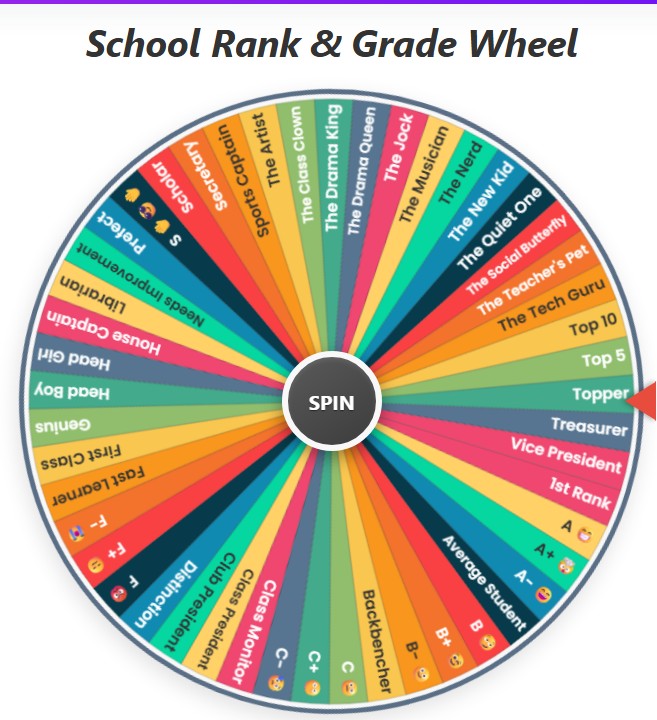
At its core, the School Rank & Grade Picker Wheel is a virtual spinning wheel, much like one you’d see on a game show. But instead of cash prizes, its segments are filled with a wide array of school-related ranks, grades, and classic classroom personalities.
With a single click, the wheel spins, the clicking sound builds anticipation, and it finally lands on a random selection, revealing your "fate" with a celebratory burst of confetti.
The tool is built on the simple yet powerful principle of randomness. It eliminates predictability and injects an element of surprise into any activity. It’s designed to be intuitive and accessible to everyone, requiring no sign-ups or downloads. You just open the page and are ready to spin.
The wheel comes pre-loaded with several thoughtfully curated categories, ensuring you have a rich set of options right from the start.
A Feature-Rich Experience: More Than Just a Simple Spinner
What sets this picker wheel apart is its depth of functionality. It’s been designed not just to perform a single task, but to be a versatile companion for various activities.
Pre-loaded Categories for Instant Fun
No need to type everything out yourself. The wheel comes ready to go with these exciting categories:
- All Ranks: A comprehensive mix of academic and fun ranks, perfect for a general spin.
- Grades: This is where the real fun begins! This category includes all the classic letter grades, each paired with a hilarious and relatable emoji. Will you land the coveted A+ 🤯, the satisfying B+ 😉, or the dreaded F- 😭? The emojis add a wonderful layer of personality and emotion to each result.
- Top Ranks: For those who dream big! This list is populated with ranks like "1st Rank," "Topper," and "Top 5," ideal for role-playing or setting high-stakes challenges.
- Fun Ranks: This category is pure nostalgia. It includes roles like "Class Clown," "Back Bencher," "Teacher's Pet," and "Most Likely to Succeed." It’s perfect for icebreakers or a lighthearted trip down memory lane.
- Full Range (1-50): For a more traditional and granular experience, this category lists every single rank from 1st to 50th, complete with the correct ordinal suffixes (st, nd, rd, th).
- Mid Ranks: A realistic look at the average student experience with options like "Average," "Middle of the Pack," and "Just Passed."
Complete Customization: Make the Wheel Your Own
While the pre-loaded lists are great, the true power of the tool lies in its customization. The "Current Items on Wheel" list is fully editable.
- Add Your Own Items: Simply type anything into the input box and click "Add." You can add student names for a fair selection, classroom tasks, subjects to study, or any custom rank you can imagine.
- Edit on the Fly: Don't like an item? Just click on its text in the list and type to change it.
- Remove with Ease: Each item has a small '×' button next to it. Click it to remove that segment from the wheel instantly. You can also clear the entire wheel with a single click of the trash can icon.
Powerful Controls for a Tailored Experience
The user interface provides a suite of controls to manage your wheel experience:
- Spin: The big button in the middle. Click it to set the wheel in motion!
- Eliminate Result: This is a game-changer. After a result is chosen, you can click the "Eliminate Result" button in the pop-up modal. This removes the winning item from the wheel, ensuring it won't be picked again. It's perfect for "last one standing" games, giveaways, or ensuring every student gets a turn without repetition.
- Shuffle: Have a long list of items? Click the shuffle button to instantly randomize the order of segments on the wheel.
- Sort: Prefer an organized view? The sort button arranges all the items on the wheel alphabetically or numerically.
- History: The wheel keeps a log of your recent spin results. You can view your history to track outcomes or see who has already been picked.
- Reset: Want to go back to the original settings? The reset button restores the default "All Ranks" category and clears your history and spin count.
Aesthetic Customization
You can even change the look of the wheel! The settings menu offers a variety of Color Palettes, from "Vibrant" and "Pastel" to "Earthy" and "Gothic." Choose a theme that matches your mood or the theme of your activity.
Creative Use Cases: Who is This Wheel For?
The versatility of the School Rank & Grade Picker Wheel makes it useful for a surprisingly wide range of people and situations.
For Teachers in the Classroom
- Fair Student Selection: The age-old problem of picking a student to answer a question or present their work is solved. Using the wheel to pick a name feels completely impartial to students and adds a moment of fun to the routine. Use the "Eliminate" feature to ensure everyone gets a turn.
- Gamified Learning: Create a wheel with different chapter names or topics. Spin it to decide which topic to review for an exam. This turns a boring study session into an engaging game.
- Assigning Classroom Roles: Add roles like "Line Leader," "Board Cleaner," or "Librarian" to the wheel and spin it at the beginning of the week to assign duties fairly and excitingly.
- Brain Breaks: When the class feels tired, a few quick spins of the "Fun Ranks" or "Grades" wheel can be a perfect two-minute brain break to re-energize everyone.
For Students and Friends
- Study Challenges: Put different subjects or difficult problems on the wheel. Whatever it lands on, you and your friends have to tackle it for the next 30 minutes.
- Decision Making: Can't decide what movie to watch or what game to play? Put the options on the wheel and let fate decide!
- Creative Writing Prompts: Spin the wheel to get a character's rank or grade. For example, if you get "Back Bencher" and "C- 😥", you instantly have the foundation for an interesting character.
- Just for Fun: The simplest use is often the best. Gather your friends and spin the wheel to see who was who in your school days. It’s a guaranteed way to share stories and have a good laugh.
For Content Creators and Streamers
- Audience Engagement: Let your viewers add their names to the wheel for a giveaway or to be picked for a special shout-out. The visual of the spinning wheel is far more engaging than a name appearing on screen.
- Interactive Challenges: Playing a game? Let the wheel decide your handicap. Spin the "Grades" wheel and if you get "F 😡", maybe you can only use the worst weapon for the next 10 minutes.
- Video Content Ideas: The wheel itself can be the subject of a video. A "Spinning the Wheel to Decide My Day" or "Letting the Grade Wheel Rate My Artwork" video can be incredibly entertaining content.
The Magic Behind the Spin: A Glimpse at the Technology
While it feels like magic, the tool is powered by robust web technologies. Built with HTML, CSS, and JavaScript, it runs smoothly in any modern browser on any device.
The wheel itself is drawn on an HTML <canvas> element, a powerful feature that allows for dynamic, scriptable rendering of 2D shapes and graphics. Each segment's size, color, and text are calculated by JavaScript based on the number of items in the list.
The randomness is powered by JavaScript's Math.random() function, a reliable pseudo-random number generator that ensures every spin is fair and unpredictable. The smooth spinning animation and the final slowdown effect are achieved using CSS Transitions, which provide a polished, high-quality user experience without lagging.
Conclusion: It's More Than Just a Wheel
The School Rank & Grade Picker Wheel is a perfect example of how a simple concept can be transformed into a powerful, engaging, and multi-purpose tool. It masterfully blends nostalgia with modern technology, creating an experience that is both fun and functional.
It serves as a fair decision-maker, an engine for creativity, a tool for classroom engagement, and a source of endless laughter. By turning mundane choices into exciting moments of anticipation, it reminds us that there's a fun side to almost everything, even report cards and school ranks.
So, whether you're a teacher looking for a new way to engage your class, a student looking for a fun way to study with friends, or just someone looking for a dose of lighthearted fun, there's only one thing left to do.
Give it a spin and see where your luck lands!