iPhone Picker Wheel
iPHONE CATEGORY
0 Models
Current Mode: None
Current Models on Wheel
Realted tool:
- Random Country Wheel | Spin for Flag, Name, or Both
- DTI Themes Wheel: Spin the 300+ Style Theme Picker!
- Truth or Dare Wheel – Spin 10 Game Modes!
- Wheel of Choice – 10 Fun Modes to Decide!
- Zodiac Sign Wheel: Spin for Your Astrological Insights
- Yes or No Wheel – Spin to Get a Yes or No Answer!
- Lucky Wheel – Spin to Win from 6 Prize Categories
Spin Through Apple's History: Introducing the Ultimate iPhone Picker Wheel
Ever felt lost in the sea of iPhone models? From the revolutionary first device that Steve Jobs pulled from his pocket in 2007 to the titanium-clad powerhouses of today, the iPhone lineup has become a sprawling family tree of technology. There’s the classic era, the "S" years, the colorful "C" phase, the game-changing "X" series, and the modern "Pro" dynasty.
For tech enthusiasts, it's a fascinating history. For the average consumer, it can be overwhelming. For content creators, it's a goldmine of ideas. And for anyone just looking for a bit of fun, it's a perfect playground.
What if there was a way to navigate this entire history with a single, satisfying click? A way to randomly land on any iPhone ever made, sparking conversation, making a decision, or simply satisfying your curiosity?
Enter the iPhone Picker Wheel—a fun, interactive, and surprisingly useful tool designed for everyone from the Apple aficionado to the casual user looking to settle a friendly debate. It's more than just a random generator; it's a time machine, a decision-maker, and an idea factory, all rolled into one colorful, spinning wheel.
What Exactly Is the iPhone Picker Wheel?
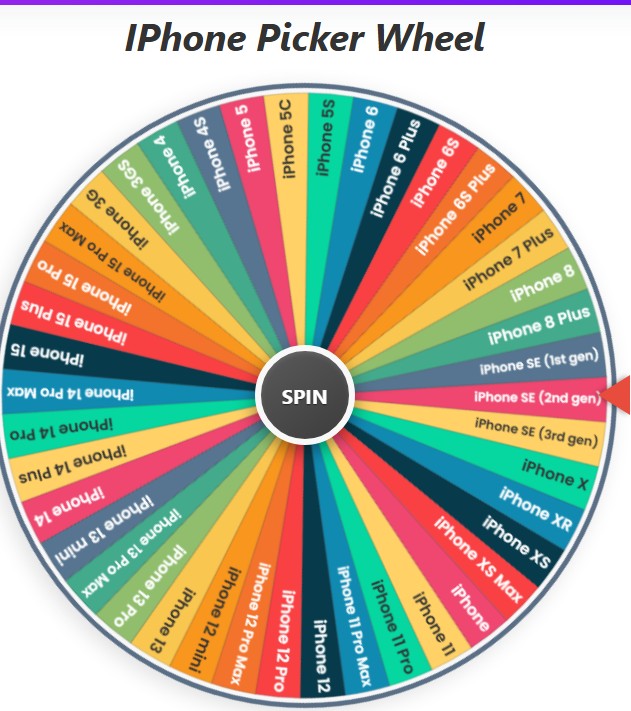
At its core, the iPhone Picker Wheel is a digital spinning wheel, meticulously populated with every major iPhone model ever released. Think of it like a game show wheel, but instead of prizes, each vibrant segment represents a piece of mobile history.
The premise is simple:
- You see the wheel, beautifully divided into segments, each bearing the name of an iPhone.
- You click the big "SPIN" button in the center.
- The wheel whirls to life with a satisfying sound, building anticipation as the pointer ticks past model after model.
- It gradually slows down before landing on one specific iPhone, announcing the winner with a celebratory chime and a burst of digital confetti.
But behind this simple, delightful experience lies a powerful tool packed with features that allow you to tailor the wheel to your exact needs. It’s a tool built for exploration, decision-making, and pure, unadulterated fun.
Who Is This Tool For? (Hint: It's More Than Just Tech Geeks)
You might think a tool like this is only for the most dedicated Apple fans, but its applications are surprisingly broad. We designed it with several people in mind:
- The Undecided Buyer: Stuck between buying a new iPhone 15, a cheaper iPhone 14, or a budget-friendly SE? Load them onto the wheel and let fate give you a nudge. It’s a fun, low-stakes way to break a decision-making deadlock.
- The Content Creator: YouTubers, TikTokers, and bloggers are always looking for fresh ideas. The iPhone Picker Wheel is an endless content wellspring. One spin could inspire a video like "Is the iPhone X Still Usable in 2024?" Another could lead to a "Revisiting the Colorful iPhone 5C" retrospective or a "iPhone 11 Pro vs. iPhone 15 Pro Camera Comparison."
- The Tech Historian & Enthusiast: Want to take a random walk down memory lane? Spin the wheel and challenge yourself to remember the key features of the model that comes up. It’s a great way to test your knowledge and appreciate how far technology has come.
- Friends & Colleagues Settling a Debate: Is the iPhone 4's "Antennagate" the biggest hardware flaw in Apple's history? Was the iPhone 6S the peak of design? Let the wheel pick the topic of your next tech debate.
- Anyone Hosting a Game Night: Use the wheel for a round of tech trivia. Spin it, and the first person to shout out the release year or a unique feature of the selected model wins a point.
- Developers & UI/UX Designers: Need to quickly pick a device to test a responsive website design on? Give the wheel a spin to get a random screen size and resolution to check.
A Spin Through the Features: More Than Just a Pretty Wheel
The real power of the iPhone Picker Wheel lies in its robust feature set. We didn't just want to build a random generator; we wanted to create a truly useful and customizable experience.
1. Comprehensive Model List
The wheel comes pre-loaded with an exhaustive list of iPhone models. From the original "iPhone" (often called the 2G) to the latest Pro and Pro Max releases, it’s all here. We've treated the list like a digital museum, ensuring every significant milestone is represented.
2. Smart Category Selection
We know that sometimes you don't want to choose from all 40+ models. That's why we’ve sorted them into logical categories. With a single click, you can narrow the wheel down to:
- All Models: The full, unfiltered experience.
- Pro Models: For those who only want to see Apple's top-tier flagships.
- Standard Models: Focuses on the base models from the modern era (iPhone 11 onwards).
- Classic Era: Feeling nostalgic? This category includes everything from the first iPhone up to the iPhone 8.
- X Series: Isolate the models that introduced the notch and the modern bezel-less design.
- Plus & Mini: Compare the biggest and smallest phones from recent years.
- SE Models: Perfect for focusing on Apple’s budget-friendly powerhouses.
3. Full Customization: Make the Wheel Yours
This is where the tool truly shines. Don't see a list that fits your needs? Change it!
- Add Custom Entries: You can type any model name into the input box and add it to the wheel. Want to add "iPhone 16 Concept" to the mix? Go for it. Creating a wheel for a "best phone of the year" battle? Add Android phones, too!
- Edit and Remove On-the-Fly: Once an item is on the list, you can click on its name to edit it or click the 'x' to remove it. This is perfect for creating elimination-style contests. Spin the wheel, eliminate the winner, and spin again until only one remains.
4. Interactive Controls for Power Users
At the top of the controls section, you’ll find a set of useful one-click actions:
- Sort A-Z: Clean up your custom list by instantly arranging all entries alphabetically.
- Shuffle: Feeling chaotic? Hit the shuffle button to randomize the order of the items on your list and on the wheel.
- Reset All: If you’ve made a lot of custom changes and want to go back to the default state, this button is your best friend. It resets the wheel to the "All Models" category and clears your history.
5. Spin History Tracker
Ever spun the wheel and immediately forgot the result? We've got you covered. The "History" button opens a modal that shows a numbered list of your most recent spins. This is great for tracking results during a game or recalling a content idea you spun up earlier.
6. Aesthetic Customization: Match Your Vibe
Who says a utility tool has to be boring? The "Color Settings" button lets you change the entire color palette of the wheel. Whether you prefer a bright and "Vibrant" look, a calm "Pastel" theme, or a moody "Gothic" style, you can make the wheel look just the way you want it.
How to Use the iPhone Picker Wheel: A Simple Step-by-Step Guide
Getting started is incredibly easy. Here’s a quick walkthrough:
- Choose Your Category (or Don't!): By default, the wheel is loaded with all iPhone models. If you want to narrow it down, simply click on one of the category buttons like "Pro Models" or select one from the "More" dropdown.
- Customize Your List (Optional): If you want to add or remove specific models, use the item list box. Add new entries via the text field or remove existing ones by clicking the 'x' next to their name.
- SPIN THE WHEEL!: This is the best part. Click the large "SPIN" button in the center of the wheel. Sit back and enjoy the show!
- See the Result: A modal window will pop up, proudly displaying the chosen model.
- Decide Your Next Move: From the results pop-up, you have three choices:
- Eliminate Result: Removes the winning model from the wheel and lets you continue with the remaining options.
- Spin Again: Closes the pop-up and lets you spin the exact same wheel again.
- OK: Simply closes the pop-up.
Ready to Spin?
The iPhone Picker Wheel is more than just a piece of code; it's a tribute to one of the most iconic product lines in history. It's a tool designed to be as simple or as complex as you need it to be. Use it to make a quick decision, to create your next viral video, to win your next trivia night, or simply to take a fun and unpredictable trip through two decades of technological innovation.
Your journey through iPhone history is just one click away. What are you waiting for?
Give it a spin!